Web Development For The iPhone And iPad: Getting Started

According to AdMob, the iPhone operating system makes up 50% of the worldwide smartphone market, with the next-highest OS being Android at 24%. Sales projections for the Apple iPad run anywhere from one to four million units in the first year. Like it or not, the iPhone OS, and Safari in particular, have become a force to be reckoned with for Web developers. If you haven’t already, it’s time to dive in and familiarize yourself with the tools required to optimize websites and Web applications for this OS.
Thankfully, Safari on iPhone OS is a really great browser. Just like Safari 4 for the desktop, it has great CSS3 and HTML5 support. It also has some slick interface elements right out of the box, which sometimes vary between the iPhone and iPad. Lastly, because the iPhone OS has been around for quite some time now, a lot of resources are available.
I know that most discussion about the iPhone OS platform centers on native applications. But you can still create powerful, native-looking applications using HTML, JavaScript and CSS. This article focuses on three phases of building and optimizing your website: design, coding and testing.
Before we get into the three phases, let’s look at some of the advantages and disadvantages of building a Web app rather than a native app.
Advantages of building a Web app instead of a native app:
- No Apple approval process or red tape, which is especially important given the terms of service dispute going on right now.
- Optimizing your Web app for other popular platforms like Android and Blackberry with the same code is much easier.
- You don’t have to learn Objective-C.
- If you’re charging users, you don’t have to share revenue with Apple.
- You get 100% control over the means of payment, promotion and distribution to users… which could also be a negative, depending on how you look at it.
Disadvantages of building a Web app instead of a native app:
- No presence in the App Store.
- Installing the app on a device is a little trickier.
- No access to some of the features that are native to the iPhone OS, such as push notification and GUI controls.
Design
Designing a Web app for this platform is much like designing a native app, so you’ll have access to some really great tools. Whether your wireframing tool of choice is pencil and paper or desktop software, you’re covered.
Inspiration
Not many people know that Apple has a “Web apps” section on its website, which is dedicated to showcasing optimized websites.
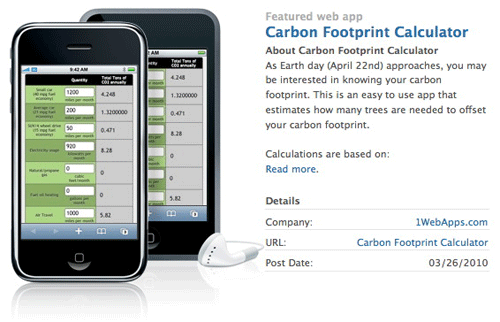
Featured Web app on the Apple website
There are also some galleries elsewhere that showcase the finest in mobile Web design:
- Apple Web Apps Listing
- Mobile Awesomeness Design Gallery
- CSS iPhone Design Gallery
- Well Placed Pixels
- Apple App Store (Even though these are native apps, you can find great visual inspiration here.)
Paper
Paper prototyping has long been my tool of choice for wireframing new ideas or websites. What I really like about the tools below is that they provide perspective on the size and dimensional constraints that you’re dealing with. To successfully optimize a Web app for the iPhone OS, you have to cut things out. I suggest keeping the design minimal by wireframing with a sharpie and one of the tools listed below.

Notepod is great for sketching out rough ideas for the iPhone and iPad.
- Notepod: iPad and iPhone sketchbooks
- App Sketchbook
- PixelPads
- UI Stencils sticky pads
- Apress iPhone Application Sketch Book
- Printable iPhone Wireframe Template (free)
Digital
Once you know exactly how things will lay out in your design, we can move to the desktop and get specific. I really like wireframing with OmniGraffle, but sometimes diving straight into Photoshop makes sense. Either way, these tools are a huge help in making it happen.
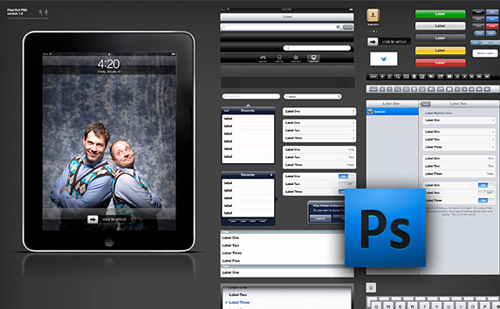
iPad GUI preview from Teehan + Lax.
- iPhone GUI PSD 3.0 and iPad GUI PSD (Photoshop)
- Layered iPhone GUI elements (Photoshop), from Designer’s Toolbox
- PSD Vector Kit (Photoshop), from Smashing Magazine
- iPad and iPhone stencils; see more at Graffletopia (OmniGraffle)
- iPhone and iPad Development GUI Kits, Stencils and Icons
Hungry for more? This article has a good rundown of additional design tools.
Coding
When you start coding for Safari on the iPhone OS, understanding how the browser works is important. Also, there are subtle differences in the iPhone and iPad’s browsers, such as how form-select boxes work. Most importantly, Safari has great CSS3 and HTML5 support, so you can use modern code without having to worry about cross-browser compatibility.
Education
Apple actually does a really good job of documenting Safari for the iPhone OS. The only shortcomings in my opinion are a lack of help with browser detection and window orientation. Read each of the articles below for everything you need to know about coding for this browser.
iPhone Human Interface Guidelines for Web Applications
This is a good overall summary of how Safari for the iPhone OS works. It’s certainly worth scanning through, because it has some good advice, although no specific coding examples.
iPad Human Interface Guidelines
This document does a good job of distinguishing iPhone elements and iPad elements. This is also worth scanning through, because it has some great advice on designing for the iPad.
Safari Web Content Guide
This document gets specific about the viewport, webclip icons, unique meta tags and event handling, among many other topics. Code examples are provided. I recommend reading it cover to cover before getting started.
Preparing Your Web Content for the iPad
This document provides tips on testing your website on the iPad, but its discussion on browser detection isn’t as detailed as I would like.
Browser Detection
David Walsh provides good examples of proper browser detection for the iPad and for the iPhone on his blog. Options for PHP and Javascript are included.
Detecting iPhone Window Orientation
This iPhone development tutorial from Nettuts provides a good example of how to vary style sheets according to the iPhone’s orientation.
Detecting iPad Window Orientation
Detecting iPad’s window orientation is much easier. Here’s what the code looks like (no JavaScript required):
<link rel="stylesheet" media="all and (orientation:portrait)" href="portrait.css">
<link rel="stylesheet" media="all and (orientation:landscape)" href="landscape.css">
jQTouch Mobile Framework
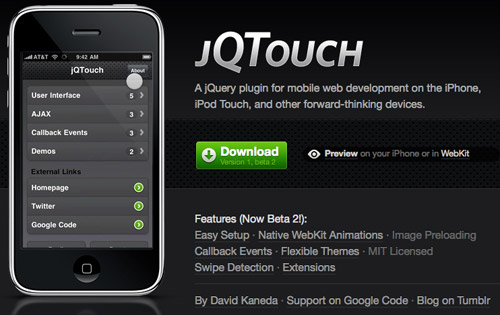
While the iPhone has a few mobile development frameworks, jQTouch is far and away the best. jQTouch gives you all of the tools to make your mobile Web app look and feel like a native one. Visit the website, and go to the demo website from your iPhone to get a feel for it.
My only complaint when building my first website with jQTouch was a lack of documentation and tutorials. I had to figure it out by playing with the demo website’s code. Here are some jQTouch articles that proved helpful in coding my first website:
- jQTouch Wiki on Google Code
- Building iPhone Apps with HTML, CSS and JavaScript, Chapter 4: Animation
- PDF slides about getting started with jQTouch, by Philipp Bosch
Testing
A crucial and somewhat tricky part of building a website or Web app for the iPhone OS is testing. It’s a little more complicated than testing in a web browser, but familiarizing yourself with a couple of tools should make the process simple.
Liveview
Liveview is a really clever testing tool for when your app is in the design or initial coding phase. It allows you to broadcast an image from your desktop onto your phone so that you can see what it looks like. This is useful for getting text size and the visual specifics just right, because sometimes visualizing from Photoshop is hard.
Using the iPhone Simulator
In my opinion, no good iPhone or iPad emulators are available. The ones that are available are a waste of time. Much better is to download the latest version of the SDK and use Apple’s official iPhone OS simulator, which of course supports the iPad as well.
Setting up the SDK and a local testing environment takes a few minutes but is well worth the effort, rather than depending on unofficial and often inaccurate emulators. I’ve written a step-by-step tutorial about setting up a local testing environment that’s worth a read. One great thing about local testing is that it’s faster and does not require an Internet connection. I highly recommend going this route until you are ready to launch.
PhoneGap: Best Of Both Worlds?
PhoneGap is a game-changer for Web developers. If you would rather create your app in HTML, CSS and JavaScript but want it to run natively and have it be available in the App Store, then PhoneGap is the solution. It’s an open-source development tool that not only compiles your code for native use on the iPhone OS but also works for Android, Palm, Symbian, Windows Mobile and Blackberry devices.
PhoneGap also steers clear of the recently controversial 3.3.1 clause of Apple’s terms of service. In other words, apps compiled with PhoneGap will still be approved. Check out the list of apps that are built with PhoneGap to learn more.
Feeling Overwhelmed?
If you are, then some good hosted services will make it easier to optimize your website for multiple platforms without having to start from scratch. There are various levels of flexibility available, but all the services use a WYSIWYG-like editor to help you create mobile websites on the fly. Depending on your Web app and client, one of the following may be a good fit:
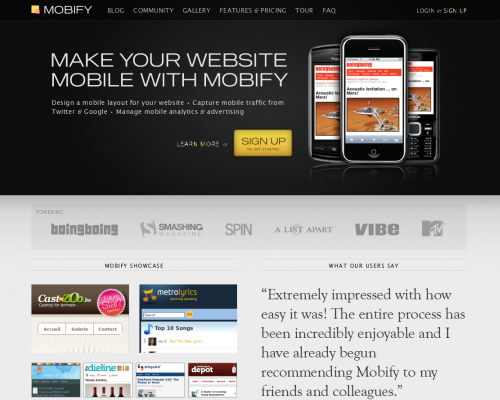
Mobify is a great alternative if you don’t care to build from scratch.
- Mobify (which powers Smashing Magazine’s mobile website)
- Wapple
- Mofuse
- Mobi10
Conclusion
It’s a great day to be a Web developer, because non-desktop platforms like the iPhone OS open up greater possibilities for us to express our creativity and entrepreneurial savvy, while allowing us to adhere to modern Web standards. All of the tools you need to create great a Web experience on the platform that’s currently dominating the mobile space are out there. It’s up to you to make the most of them!
(al)


max
May 28th, 2010 3:37 amNice!
Renegade
May 28th, 2010 3:44 amInspiring. :)
Feedingo
May 28th, 2010 3:51 amThis is exactly what i needed :) Im working on a new web app, and I see an iphone/ipad version in my future. Thanks!
wwe
August 5th, 2011 3:00 amplease provide page flow script for ipad
butre
May 28th, 2010 4:21 amAn other great development platform for creating native iPhone, iPad, Android and Blackberry apps just programming in javascript is Titanium Appcelerator
maik
May 28th, 2010 4:21 amNick – you’re wrong regarding 2 very important points:
1. you can access ALL hardware features with a web app
2. you can put your web app on the app store
To do so you need to use a open source framework (not only for iPhone/iPad, it also works for Android, etc) called Phone Gap,it gives you JS methods to take advantage of all hardware features that are accessable by native apps.
Phone Gap also allows you to make your web app a native app that you can submit afterwards.
There are hundreds of web apps using Phone Gap in the app store.
To get a good glimpse on the whole process of developing rich iphone web apps without objective c I highly recommend Jonathan Stark’s “Building iPhone Apps with HTML, CSS, and JavaScript: Making App Store Apps Without Objective-C or Cocoa”
just my 2 cents
Regis
May 28th, 2010 6:42 amHi maik – It is true that the frameworks like Phone Gap and Appcelerator’s Titanium are great. I personally started to play with Titanium with some success. I don’t think that it gives access to ALL hardware features though. The example that comes to my mind is bluetooth. I don’t think it is available in Titanium’s API yet, is it in Phone Gap?
maik
May 28th, 2010 7:18 amHi Regis,
without Phone Gap you can access the maps app only, with phone gap the accelerometer, magnetometer, vibrations, sounds, alerts, geo location, camera, offline database & caching, gesture, multi-touch – think Bluetooth is on the roadmap – you can get a good overview from this table:
http://phonegap.pbworks.com/Roadmap
Gadgetto
May 28th, 2010 8:11 amBe careful with using PhoneGap or similar layer frameworks, as Apple recently changed the developer guidelines (Section 3.3.1). Using such frameworks could result in a rejected app!
Nick Francis
May 28th, 2010 9:46 am@malik – keep reading the article :-). The section called “Phone Gap: The Best of Both Worlds?” mentions this. However, PhoneGap doesn’t provide ALL native functionality that coding with Objective-C does. I still think it’s great though.
@Regis and @Gadgetto – PhoneGap is A-OK with the new terms of service and Titanium is not. I wouldn’t be building anything with Titanium, as last I heard those apps will no longer be acceptable.
Rob
May 28th, 2010 4:28 amAlso check out iWD: http://www.mgateway.com/iwd.html
There’s a pretty cool YouTube video that demonstrates an iWD iPhone App being developed in 7.5 minutes! http://bit.ly/cf6Bm6
keemor
May 28th, 2010 4:45 amIn Titanium Appcelerator u can not only write in JavaScript, HTML & CSS, but also in Python, Ruby, and PHP
http://www.appcelerator.com/showcase/
Hung Bui
May 28th, 2010 4:50 amReally nice article covers iPhone app. I really like a concept of developing a mart-phone app without knowing its language.. It would be much better to just build on css, xhtml and php.
It’s worth checking out appcelerator.com as well.
Christopher Campbell
May 28th, 2010 4:58 amBrilliant article. I love the Notepad. Might have to buy one of those :)
Christopher Anderton
May 28th, 2010 5:02 amWhile i am on a Mac, i just wanted to say, that the Apple iPhone/iPad SDK is Mac-only. So if you looking for a simulator for Windows, you have to look for another solution.
Igor Faletski
May 28th, 2010 5:02 amHey guys, thanks for the shout out! Great article – we’re looking forward to a lot of great mobile websites from everybody
Igor from Mobify
Arni
May 28th, 2010 5:20 amUseful Article! Dinamo Riga Champions!
Dennis
May 28th, 2010 7:47 amNot to shoot the pretty good article down, but is it not so, that the fastest growing smartphone os is by far Android?
Furthermore I have problems with seeing the magic of the ipad besides its overprice..as clumsy a tool as your random laptop with very lowclass hardware. For a high price.
To just assume it will be huge before we see any effect of it does not seem sensible but rather as public relations..
Safari is NOT an excellent browser on the iphone..its slow and buggy in comparison.
I dont buy the reasons to start this area. As little as I would buy another iPhone.
Nick Francis
May 28th, 2010 9:51 am@Dennis – I believe Android is now the fastest growing platform now … it’s just a bit different because many devices use it, but you are correct.
I’m capable of an objective opinion about Apple and I really like my iPad for about 100 reasons I won’t get into. I know many people aren’t happy with Apple’s decisions lately, but most of them are good for the long term and for web developers IMO. Even if you don’t like the iPad, it’s something we as web developers should pay attention to since it’s selling a reported 200k units per week.
I would argue with your comment about Safari. I think Webkit is great (great enough for Google too). I don’t ever see bugs with it on the iPhone OS.
Dennis
May 28th, 2010 10:35 amThanks for the reply!
The iPad-discussion can offcourse be had in one of a million ways or more, I just find the kneeling before it in a shrinelike manner to be utterly annoying. My laptop works perfectly and is way easier to use (if you want to do something with the thing that actually demands typing…)
Webkit is a good thing, I agree on you there, but the all-knowing (;P) people on Apple must have done SOMETHING with the way they’ve wrapped it in the browser cause I’ve always found browsing in general a bit tedious and slow. (http://korta.nu/speeds provides SOME numbers)
Obviously I am missing something here, concerning Apple. A million flies…sorry, design-interested people, cant be wrong, right? :)
I do agree with you that webdesign in general need to be on its toes concerning future and development. I just think its way too soon to say anything regarding the iPad. Reading books and papers is NOT going to be easier and more eye-friendly on a 9 inch screen than on a 20 inch lcd. For instance.
Might be famous last words, but I am totally sure that the iPad will not be an item that we even talk about in a few years time. ;)
That said I wish you luck. Smashing magazine in general have saved my webdesigner-life.
Jurica
May 28th, 2010 5:23 amDo not let Apple and other evil companies to dictate direction and way of web development,
the way of design, and the way of lookin at the world around us.
Micha
May 28th, 2010 7:26 amright!
mtrang
May 28th, 2010 5:28 amThanks for the article. It will be a great help when I start designing for mobile devices.
Chris
May 28th, 2010 5:55 ami’m with Jurica. There should be a nice cross-platform way of web developing for mobiles. Android, Symbian, iPhone… they are all little computers. No APIs for just a brand. Please web develop for every gadget. It can be done.
Remi Grumeau
May 28th, 2010 6:15 amPerhaps people could use some clarifications and tips here.
First, iPhone is definitely not 50% of the smartphones market worldwide. What i have here is 34% for iPhone, 28% for Opera and 18% for Nokia webkit browser. 50% is for north america (Blackberry at #2 w/ 22%).
Second, JQTouch framework (if you don’t know JQuery, i’d rather go iUI…) are good for webapps… but not for mobile websites. Why? Direct linking! Simple case study: fact 1: Facebook is driving more traffic than Google since 2010 Q1 in USA. Fact 2: 1 connection on 4 to FB is via a mobile (smartphone or feature phone). Fact3: people “share” deep links in it. Fact 4: Anchor-style navigation of those frameworks brings you back to its homepage. So go to http://jqtouch.com/preview/demos/main/ and click on the first two links. Refresh. Oh god, back to the homepage! So if you share a specific page of a website, let say ” home / page_1 / subpage_1 ” on FB, and one of your friend click on the link using a smartphone with those framework automatically switching to this mobile version, he/she will go down to the site homepage … which, you’ll be agree, makes nosence. (Ex: http://jqtouch.com/preview/demos/main/#edge is first two links). Not to say that it will not work for 30% of worldwide mobile users, and neither BB users (since BB do not support HTML5 yet).
No direct links. So what Google will think about that? In fact … nothing. And desktop version of your site will not help in SEO neither since the direct link in Google will bring the mobile user to … the homepage of the mobile website. Fail.
So if you just want to create a webapp for iPhone and Android, JQTouch (or again, iUI or WebApp.net) will do the job. Otherwise, you should really think twice and if still focusing on iPhone/Android rather take a look at things like iWebKit, or if you really want a full SEO+Nokia+BB+Opera(mini and mobile)-friendly solution go for a plain xHTML/CSS2 website using % for width (and why not use a platform detection JS to switch CSS files between tablets/large screen smartphones/BB/feature phones and use JS or not.
Last but not least: Tablets.
With on million iPads sold only in USA and it’s availability in Europe (good to know: iPhone market share in Europe is 50% too) today, HP to (probably) switch to WebOS for its next tablet and Samsung/Acer/Dell/… to go Android for theirs, the tablet market is not to forget. Go back to my Second step here since it’s the same issue for direct links from Digg, Twitter, FB, … even email! What happens if you send a newsletter with dozens of links and your visitors to be redirected to the homepage on each ones?!
Good to know: Apple does not include webapps in the App Store in iPhone/iPad. So you can submit your webapps to apple.com, but well… users simply don’t go to apple.com/webapps :)
Cheers,
Remi
James Tupper
May 29th, 2010 2:36 pmI’d be surprised if iPhone is really 34%. Blackberry still dominates the US market, and Android has been getting close to iPhone’s market share.
Thanks for at least clarifying that the 50% thing is bogus though. This article really needs an edit.
Chris Tanner
May 28th, 2010 6:18 amOver at teehan+lax we just released the iPhone Sketch Elements AI, perfect for mocking up app flows.
http://www.teehanlax.com/blog/2010/05/17/iphone-sketch-elements-ai/
JaredP
May 28th, 2010 6:19 amwhy to create a web app if (based on this article) it has: No presence in the App Store. makes no sense.
Leon
May 28th, 2010 6:23 amCool, thanks for mentioning mobi10. Awesome article, mobi10 is built using django and we will be adding QR code support soon. check us at http://mobiten.com
Leon from mobi10
SteveJobsIsNotJesus
May 28th, 2010 6:28 amLike the article, like the Apple products (some of them) but don’ like the way Apple treats the developer community.
Dennis Spencer
May 28th, 2010 6:48 amThank God for this article!!!
Fancy
May 28th, 2010 8:28 amIt’s very useful for me,thanks!
Maanu
May 28th, 2010 8:33 amGreat post-
When will I find a step by step guide for a beginner to start and to create web, iPhone/iPad, Anroid apps ?
I know there is tons of stuff online but it just takes you from one web page to another. There is something always missing. I am a web designer and would really like to get myself started on Mobile design. Suggestions please.
Thanks!
Tai
May 28th, 2010 8:37 amMore people use IE6 than these devices. I yawn in your general direction.
Nick Francis
May 28th, 2010 10:14 amTai you are living in the past. We both know this is changing rapidly and won’t be the case within a year. If you build websites, it’s in your best interest to optimize for devices like this, whether you like Apple or not; just like it’s in your best interest to optimize for IE6 until people stop using it.
WallMountedHDD
May 29th, 2010 1:19 pm@Nick, you couldn’t be more subjective and basically wrong. Especially about the IE6 bit. If you keep supporting it, it’ll only linger longer. Eventually enough is enough, and you have to take the baby’s bottle away to force it to grow up. If you wanna support it because you’re an anal retentive, obsessed with technical correctness, semantic-loving, buzzword slinging elitist then fine. Cool. But not if you just think it should be supported cause it’s there and it’s our “duty.” Bull.
Nick Francis
May 31st, 2010 10:50 amReputable studies like this one (http://news.cnet.com/8301-17939_109-10231713-2.html) show that 60% of companies in America are still using IE6 as their browser of choice. Pretty much everyone using it doesn’t have the choice to upgrade for one reason or another. Refusing to optimize for it without looking at the numbers is more “elitist” in my opinion.
Of course it’s always the developer’s choice, but our company supports IE6 if more than 5% of incoming traffic is using it because I think it’s what we’re being paid by the client to do. If incoming traffic is less than 5% we don’t typically worry about it.
Michael Nix
May 28th, 2010 8:52 amWow this is a really helpful article. I’m about to begin working with a developer on our first app and I truly did not want to buy a “dummies” book. I may still, but this will keep me busy for quite some time. Thanks!
And Tai, more people do a lot of things… like eat. And smoke. Designing and developing web sites for IE6 users is important, but if you’re a designer or developer you have to embrace new technology and methods. Adapt buddy, adapt.
Kerem
May 28th, 2010 9:20 amSuch a great article. Exactly what I was looking for.
Dennis
May 28th, 2010 10:37 amA note about the future. My HTC Desire can render webpages just perfectly. No need for any particular optimization. ;)
Christopher Anderton
May 28th, 2010 11:43 amI think you are missing the point Dennis. It’s about the screen size, not if the browser can render webpages perfectly. You don’t optimize print CSS as you do for regular webpages do you? ;)
WallMountedHDD
May 29th, 2010 1:23 pm@Christopher, I think the point Dennis indirectly tried to make is that web developers shouldn’t stress to make their sites phone optimized (which severely limits what they can do unless they make a mobile sister site, like many do, which means making two sites for every site you make). It’s a matter of us not bending to phones, but phones bending to us. Phones should be made to accommodate our websites.
James
May 28th, 2010 12:09 pmAnother disadvantage, depending how you look at it, could be no flash support. Something to consider when creating your web app as opposed to a native app.
Jay Dalisay
May 28th, 2010 1:00 pmNow this is nice! I love the Notepad.
Vladimir Grichina
May 28th, 2010 2:54 pmWe are also making sketchbook for prototyping iPad apps on paper — http://www.ipadsketchbook.com/.
Would be nice if you include it in the post, I think it is not less relevant than notepod or appsketchbook.
Scott
May 28th, 2010 3:49 pmThanks for the post. I’ll add one thing to the disadvantages though: apps that are forced to require frequent server connectivity to retrieve data because that data can’t be stored in a local/client database are not well suited for iphone web apps.
Matthew James Taylor
May 28th, 2010 7:20 pmWow, some great tools here that I didn’t know existed.
I made an iPad CSS layout that changes design when rotated if anyone is interested:
http://matthewjamestaylor.com/demos/ipad-css-layout/index.html
I think there is going to be a huge wave of useful iPad and iPhone web development tools now the iPad is out. It’s an exciting time :)
LarsS
May 28th, 2010 10:46 pmNice article. Now I have no excuse for making my own app. Thanks!
john
May 29th, 2010 2:44 amF***CK the iphone , bring on some Android Articles
tripdragon
May 29th, 2010 11:34 amfyi. tumblr built sites do this automatically.
But lots of good reads here. Thank you.
WallMountedHDD
May 29th, 2010 1:16 pmConsidering most people I know outside of the US and some parts of Canada say the iPhone craze is pretty much all us, I find “iPhone operating system makes up 50% of the worldwide smartphone market” hard to believe.
p.s. I too am sick of all the special attention the iProducts get. Make it “how to make mobile sites,” and not just iPhone-centric stuff.
Nick Francis
May 31st, 2010 10:38 amI’d like to clarify the 50% worldwide market statistic in the article. As the article says in the beginning, these figures are according to AdMob (owned by Google now), one of the foremost authorities on mobile analytics. AdMob reports are slanted towards mobile web browsing (not overall mobile handset usage), as all the impressions on their network are from web traffic. However, as web developers that’s the kind of data we’re looking for anyways.
According to the AdMob Mobile Metrics Report from March, 2010 (available here- http://metrics.admob.com/2010/04/march-2010-mobile-metrics-report/), the iPhone OS makes up 46% of worldwide operating system share. The previous three months it was at 50% or higher. That’s where the number comes from. It’s much more accurate than a Google search as James suggests.
This article was written prior to the April report being released, but the share went down to 42% in April. Android has been 24-25% all three months. Android is only picking up significant OS market share in the US, which is where they now outnumber the iPhone OS.
Even if the number is 42% worldwide, the iPhone OS is a big player in the mobile market and will remain as one. That’s where the best mobile design is being done, which is why we’re talking about it more. Android will get there eventually.
James Tupper
May 29th, 2010 2:32 pmYou REALLY need to clarify that 50% market share thing. That has to be skewed, a lot. And that really changes the purpose of this article.
Please do a quick Google search for ‘world smartphone market share’ before posting such an important piece of information.
Jen
May 30th, 2010 5:01 amHere is another great example of an web based iPhone app:
http://www.deliciousdays.com/recipeshelf/
Surely, it’s primarily for cooks, like myself, but it works awesome and the final version with its offline mode, works indeed like local app. Amazing.
jk
May 30th, 2010 12:07 pm50% market share is a blatant lie. Where did you pull that info off? This is why I don’t like apple fanboys.
Henry
May 31st, 2010 8:57 amThanks is not enough.
Many many many thanks!!!!!!!!!
butters
June 1st, 2010 5:40 amHey Nick, do your research! “Android operating system continued to shake up the U.S. mobile phone market in the first quarter (Q1) of 2010, moving past Apple to take the number-two position among smartphone operating systems.”
http://www.npd.com/press/releases/press_100510.html
butters
June 1st, 2010 7:03 amFor anyone worried about Flash on the iPhone chech out this nifty article:
Smokescreen makes Flash content visible on iPhone and iPad (video)
http://alt.engadget.com/2010/05/30/smokescreen-makes-flash-content-visible-on-iphone-and-ipad-vide/
mhtechno
June 1st, 2010 8:20 amThaaank you sooooooooooooooooooooo much
Maryam
June 1st, 2010 11:32 amGreat Post, thankx alot
Ivar
June 1st, 2010 6:59 pmWell I find this article not finished, I feel like reading newspaper, like a general topic.. It is not so deep and to my mind it is just a type of “to be continued” article.
At this point you could make article not only for iphone/ipad but also for other market players, it would start the same, but the “coding” section would be bigger. No offence.
To my mind everybody try to cut each other throats in comments because of one simple thing – we know/feel that current domination of apple will come/is comming to an end.
mangopudding
June 1st, 2010 9:54 pmHi there.
Another useful tool in creating mobile websites is iWebKit (http://www.iwebkit.net).
- Simon.
Rebecca H
June 2nd, 2010 12:51 amah thats great
Benjamin
June 2nd, 2010 7:31 am@mangopudding: Chrome is not allowing me to see iwebkit website because it could harm my computer!
Tesla
June 2nd, 2010 10:37 amWoow…great tips. Notepod looks awesome, i will definitely try it out.
There is a nice resource on how to build iPad apps with iPhone SDK at http://ipadappsplus.com/ipad-apps/how-to-create-ipad-apps/
TutorialPoint
June 2nd, 2010 11:29 am@Benjamin: That’s because the website is blacklisted; it doesn’t actually contain any kind of malware, virusses etc. It’s an awesome framework, and most of the webapps of the iPhone/iPod touch are litterally made with iWebkit.
Bog
June 3rd, 2010 4:45 amThe conclusion is just false. Apple fanboysh
Antony Swans
June 3rd, 2010 5:21 amCreating a separate mobile version of website isn’t good enough. There are drawbacks.
There is a simple solution of making websites compatible with both – desktop and mobile browsers. See MobilizeToday.com (http://www.mobilizetoday.com)
Michael Hart
June 3rd, 2010 7:08 amWow! What a wealth of info… I’ve done some work developing HTML/CSS for websites on mobile devices, and used many of the things here. Plus, you introduced me to some new ones which seem really helpful.
It will be very interesting to see where the pendulum swings: to webapps or native apps. Go webapps!
Carolyn King
June 3rd, 2010 3:13 pmFantastic overview and really useful links; thanks for the article!
Heinrich
June 4th, 2010 7:05 amAnyone else notice 420 on the iPad? no?
Chicken Hero Defender
June 9th, 2010 2:55 pmCool. Inspired and very useful.
Thanks
Matt
June 10th, 2010 5:50 amyou can have a look with your ipad, iphone or ipod touch on this link:
http://www.smartcoyote.com/ipad
it’s a small demo made as a “web iphone appli” with mysql connect queries.
Gigas
June 25th, 2010 1:27 pmwhat the duck?
all people knows that Nokia and Symbian are leaders in smartphone market!
timmy
July 8th, 2010 5:31 pmipad got so many problems,but still can’t stop people buying.
Why?
I guess just outlooking attract many,and some Personalize setting make you more comfortable.
Specially,it never similar with any others,so if you are conditioned to use Apple stuff,you are in.
jtang
November 19th, 2010 2:16 pmDo you have any JQuery plug-in for iPad? For example, book fliping.
Guilherme
January 13th, 2011 9:47 amThank you for this informative article! I’m thinking of offering this kind of service for my clients and this will be my starting point.
Jim
March 6th, 2011 5:44 amMany thinks for sharing this! This will be an excellent start point for my iPhone web development.
george
March 13th, 2011 1:45 amGood article.
But I want to say that using HTML and JS to develop Apps is not so simple, and you must plan a lot of debug hours… and many hassles…
I’ve tried a less heroic way, but robust and simpler: working on PDF and adding multimedia to it (see pdftoipad.net).
If you are planning a real interactive App it is actually frustrating, but if are planning a Magazine App, it works:
You can continue to work with your favorite software, like InDesign, and focus you on the contents, planning where to insert slide-shows, video, or other things
Incircle Media
June 8th, 2011 4:12 amExcellent tuts and guideline. It is perfect guide line for beginners as well as experts.
Thanks to share.
Colin Boyd
June 22nd, 2011 3:43 amA great resource to learn at least the basics of iPad / iPhone development is the following tutorial :
infiniteskills.com/training/learning_to_build_apps_for_iphone_ipad.html
This is how I got started, it does include some very basic coding, but in the main the lessons are quite easy to follow and come with working files. Not really aimed towards the more advanced programmer, but a great resource to help get started. Just my 2 cents worth.
Alex
October 11th, 2011 5:35 pmI wonder why Smashing Magazine has dropped their mobile website with Mobify? At least when I try to visit m.smashingmagazine.com from iPhone I am forwarded to the main site.
Skipper
December 14th, 2011 3:44 pmExcellent guideline, Thanks
Railwaymen
May 22nd, 2012 1:03 amWow, I really like these notepads. Giving your ideas on paper first seems odlfashioned, but it really works. You feel more connected to the things in your head.
iFI
June 13th, 2012 12:06 amFirebug lite and a few other handy tools in iDebug for iPad:
http://itunes.apple.com/us/app/idebug/id525956537?mt=8
Alex
March 2nd, 2013 1:28 pmSuper Cool insight on iPad and iPhone web design and development. The Galleries and Design tools are excellent resources. Thank you!
Alex
Isadora Design – Professional Web Design Studio